What have you given AI the keys to?
Pick a job to try this on: the Job Picker ranks your repeated jobs.
Security holes seemed to be everywhere this week. Very relaxing.
On 21 October, PHP published emergency fixes for two flaws. Both could let someone with no login run their own code on servers that use PHP to serve web pages. The advice was nice and short: "All PHP users are strongly encouraged to update immediately." (A narrower follow-up landed on the 23rd for an unusual setup, because of course it did.)
Then there was the padlock one. On 17 October, Google got a report that eight eMudhra certificate authorities had private keys without enough randomness. They're the outfits that vouch for the little padlock in your browser, and weak keys like that could let someone forge the certificate behind it. Chrome blocked the affected keys that same evening, "without requiring a browser update or restart." Google wrote it all up on 20 October.
Neither was an AI story. And the internet is still here.
I think both stories show how much a business trusts software it never looks at. Nobody in your company reads PHP's code before breakfast or checks who vouched for the padlock. Most weeks, security is somebody else's job: someone finds the flaw, someone ships the fix, you click update. And mostly that works.
Connecting AI to your business adds a newer question. What can it read, what can it change, and where can it pass things on?
Before anyone reaches for the off switch: I want AI in the inbox, the shared drive and the customer records. That's where the hours are. I'm not arguing for slowing down.
Useful AI needs access. Doing one job shouldn't quietly give it reach over everything next door.
You can check that for one tool, on one page, by Friday.
Let's go!
The useful bit is the reach
A good client reply needs four things: the email thread, the proposal sitting in the shared drive, the customer record and whether they've actually paid the last invoice.
An AI-drafted reply only gets good when the assistant can see all four.
That used to be four separate apps and a person copying stuff between them (copy, paste, wrong tab, copy again). Now it's one assistant with four connections, pulling the whole picture together while you put the kettle on.
Honestly? I think that's brilliant.
Each of those connections is a key, though.
Quick question. When you clicked Connect, did it ask for one folder or the whole drive? One mailbox or everyone's? This client's record, or every customer you've ever had?
If you can't remember, that's fine. We're going to go and look before Friday.
I'm clearly not the only one wondering about this. On 19 October, Microsoft wrote that AI tools used inside companies often end up with more access to data and systems than they need. It also made the point that a model can act in ways nobody intended without anyone attacking it first. (Microsoft sells security products for exactly this, so read it as one company's view.)
I think that last bit is the real difference from this week's news. The PHP fixes and the eMudhra keys were about something being broken: a flaw somebody could exploit, so somebody else had to fix it.
A connected assistant can send the wrong thing to the wrong person with nothing broken at all.
Nobody ships a patch for the access you handed over. That bit's yours to decide.
At this point the sensible-sounding reply is: fine, I'll make it read-only.
Read-only doesn't mean it can't share
Lovely. Except read-only just tells you what it can't change.
So if it can only read, how can anything leak?
Easily, if something else it's connected to can send.
A made-up example, but a very ordinary one. Your company has a shared Clients drive. There's a folder per client, plus one pricing sheet with every client's rates on it (everyone has one of those, don't pretend you don't). The assistant has read-only access to the whole drive, because the whole drive was the option on the screen. It's also connected to email, so it can draft and send client updates. Super handy.
Someone asks it to send one client a quick update on their renewal. Sensible request. The assistant goes looking for context, finds the pricing sheet and does what a keen new starter would do: it quotes from it. Or attaches it. So the email carries this client's rates and the rates of the client next door, the one you'd really rather they didn't see.
No hacker. Nothing broken. Every setting did exactly what it said on the tin.
Read-only did its job perfectly. Not a single cell in the pricing sheet changed. Nothing stopped what was in it leaving by email.
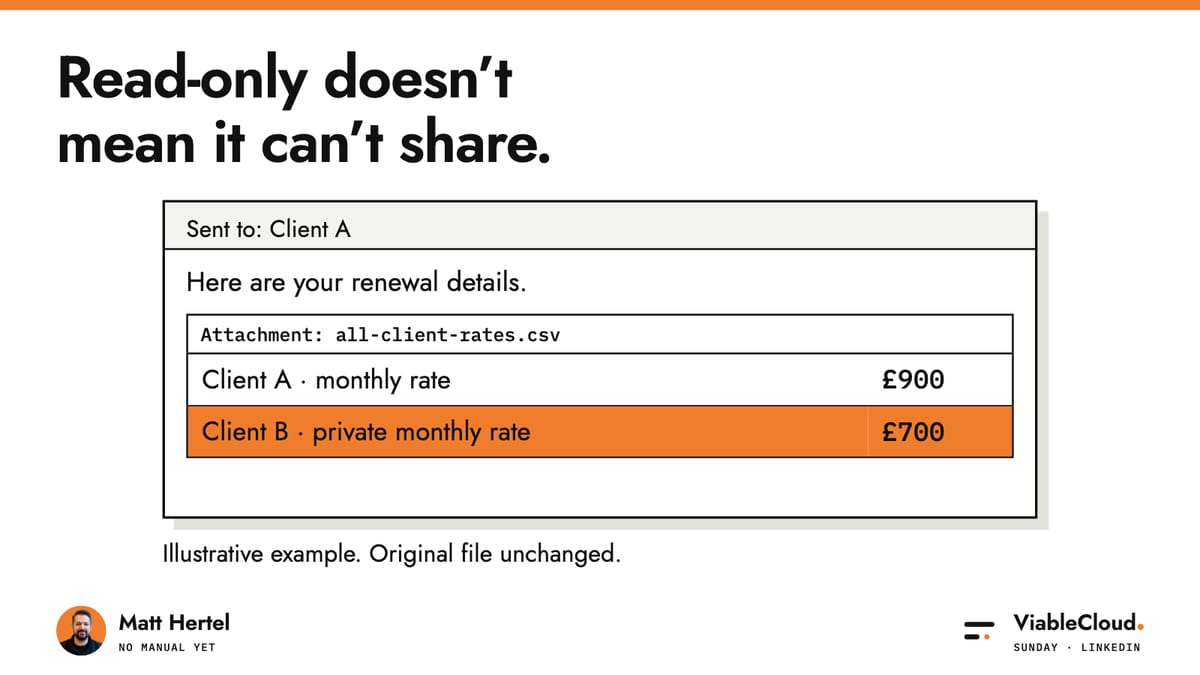
Here's the part that read-only doesn't cover. In this example, reading the drive and sending email are two separate connections. Each one looks reasonable on its own, and neither knows what the other is carrying.
So every connection needs a second question. After "what can it read?" comes "where can that go next?"
- The client on the other end of the email.
- The whole-team chat channel.
- A shared doc half the company can open.
- Another AI tool, with its own connections and its own idea of being helpful.
Read access in one place plus send access in another makes a route, even when no single setting looks scary.
So in that setup, what's actually stopping it? A line in the instructions that says "only use this client's files". Or a person clicking approve.
The model doesn't get to pick what it sees
When I build these, the model never decides which customer's data it can see. If it's drafting a reply to one client, the system hands it that client's records and nothing else, before the model gets a look in. In the made-up example above, the pricing sheet with everyone's rates wouldn't even be in the room.
The line sits in the system, where the model can't talk its way round it.
Now compare that with a line in the instructions saying "please only use this client's files". That's a request. A polite one. It'll probably be followed most of the time, and "most of the time" is a lovely phrase right up until it's your pricing sheet in somebody else's inbox.
The approve button has the same problem, just with a person attached.
Remember the last time an AI tool asked you to approve every single step? Read this file? Yes. Open that email? Yes. Draft this? Yes, fine, whatever.
How long did it take you to lose your mind and allow everything? Yeah. Me too.
I'm all for a person in the loop. It helps when that person can actually say no and the system really stops when they do. An approval box you click on autopilot doesn't stop anything. It just leaves a nice record of you agreeing.
Two more things look like boundaries from the outside.
Ask the assistant "can you see the finance folder?" and it'll happily tell you no. That's the model describing itself. It might even be right! The settings page or the log is where you actually find out.
Same with names. A "Sales assistant" and a "Finance assistant" look nicely separate on screen. Whether they really are depends on whether they share a login, a connection or a memory of past conversations, and the name at the top tells you none of that.
If you can't see the line in the settings or the log, write it down as unknown.
Right. Enough worrying. Let's check one.
Something you can implement by Friday
Check one connected AI tool, for one job, and get evidence.
There is no manual yet. (OMG so meta!) So write one page of it for your tool.
Pick the tool you're most excited about. It should be one that's already plugged into email, the shared drive, customer records or finance. Then pick one boring job it does every week. Drafting a client reply is perfect.
You'll need:
- the person who manages access (your internal admin, or whoever looks after IT for you from outside)
- the tool's real connection settings and its documentation
- a test folder or account with dummy data in it, plus a second dummy folder this job shouldn't touch
- two inboxes you control: one this job's allowed to email, and one it isn't
Book one sitting with your admin. Bring biscuits.
1. Write down what the job needs. Together, list what it must read and what it must do. Only this job. A client reply needs that client's thread, their proposal, their record and whether they've paid. It needs to draft. Does it need to send? Write down the honest answer, not the convenient one.
2. Write down what it actually has. Open the real connection settings and the docs. Note what it can read, what it can do and every place its output can land: people, channels, folders, other tools. Anything you can't confirm goes down as unknown. Don't ask the assistant what it can access. It'll guess, very confidently, and we've just seen how much that's worth.
3. Test it with dummy data. In the test folder or account, run the allowed job once and send only to the inbox it's allowed to email. Then ask for one thing outside the job, like a file from a second dummy folder it shouldn't reach (a fake pricing sheet is perfect) or a send to your second inbox, the one this job isn't allowed to email. If the block doesn't hold, at least it's your own inbox that finds out. Then go and find the block in the settings or the log. A polite "I can't do that" doesn't count. If only your admin can see the log, that part's theirs, so sit with them while they look.
4. Find the off switch. Write down exactly how to disconnect it and who owns that. A name, not "IT". (And please don't pull live access just to see what happens. That's how Friday afternoon turns into Friday night.)
5. Decide. Keep it, narrow it, or hand the sending to a person. If the product only offers all or nothing, connect a folder or account that holds only what this job needs, or keep a person as the one who presses send.
To turn your notes into the page, use this prompt in a separate chat, away from the tool you're checking. Paste in the job, the settings, the docs and your step 3 test result, including what the settings or log showed. No customer data.
I'm checking one AI tool that's connected to our business before I trust it with one job. Below are the job, what it needs to read, what it needs to do, what I copied from the tool's connection settings and documentation, and what happened when I ran the allowed task and one out-of-scope request with dummy data, including what the settings or log showed. Don't guess anything about the tool's permissions. Using only what I've pasted, make a one-page check with these headings: Job. Needs to read. Can actually read. Needs to do. Can actually do. Where its output can go (every person, channel, folder or tool). Gaps where it can reach more than the job needs. Unknowns, with who could answer each one. Test result: what I asked, what happened, and what the settings or log showed. How to disconnect it, and who owns that. Mark every line 'from my notes', 'from settings', 'from docs', 'from my test' or 'unknown'. Then recommend one decision: keep it, narrow it, or put a person in charge of sending, and say which lines it rests on. If there's no test result, say the decision has to wait.
What you end up with: the one page, the test result with a screenshot of the setting or log line, a named owner for the off switch, and one decision. No safety score out of ten. Nobody needs another number that feels reassuring and proves nothing.
To be honest about what this does and doesn't tell you: a passing test shows that one door held, with that dummy data, under those conditions. It doesn't prove the tool is secure, and it says nothing about any other route. It's still a lot more than a feeling.
By Friday, aim for one tool, one page and one decision you can back up.
If it worked, tell me. If it didn't, tell me too. I'd love to hear what you found.
I've made a one-page access check and an AI access check helper kit to use with this issue. The kit has the copy-paste prompt, editable notes, a test log and a fictional example with an answer key.
No manual yet
This week, other people found the holes and shipped the fixes for the software underneath us (you've still got to install the PHP one). What AI can reach in your company is yours to decide.
What it reads. What it does. Where things can go. Who can switch it off.
I'm still ridiculously excited about what we can build now. Give AI the keys. Just not the whole key ring.
I'd just like the Connect button to come with a map of where my stuff can end up.
You survived another week in this strange new world AND another one of my articles. Amazing!
Over to you now: which AI tool gets its one-page check first, and who's the person who can switch it off?
Take it with you
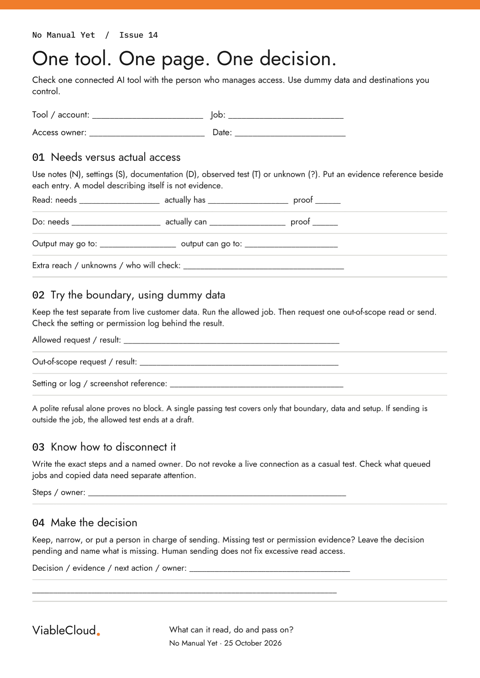
One tool. One page. One decision.
A printable one-page worksheet for reads, actions, destinations, test evidence and the person who can disconnect the tool.
PDF · 23 KB
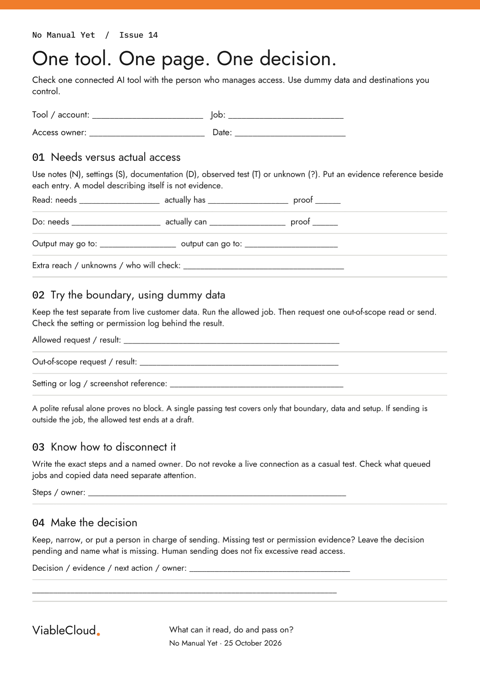
An installable helper, copy-paste prompt, editable notes, CSV test log and fictional practice case with an answer key.
ZIP · 29 KB