Inside an AI-native company, you hand AI the whole job.
Pick a job to try this on: the Job Picker ranks your repeated jobs.
Everyone's AI-native now. It's on the website, in the pitch deck and usually next to a diagram with a lot of arrows.
The more arrows, the more AI-native. Obviously.
So what does it actually feel like to work inside one? Let's start with what it feels like for most of us right now.
You ask AI to research a company, read what comes back, copy the good bits into another chat, ask for an email, paste back the thing it forgot, fix the tone because it's suddenly very excited to "reach out", and then sit there deciding whether to send it.
The AI did every step. You were the conveyor belt.
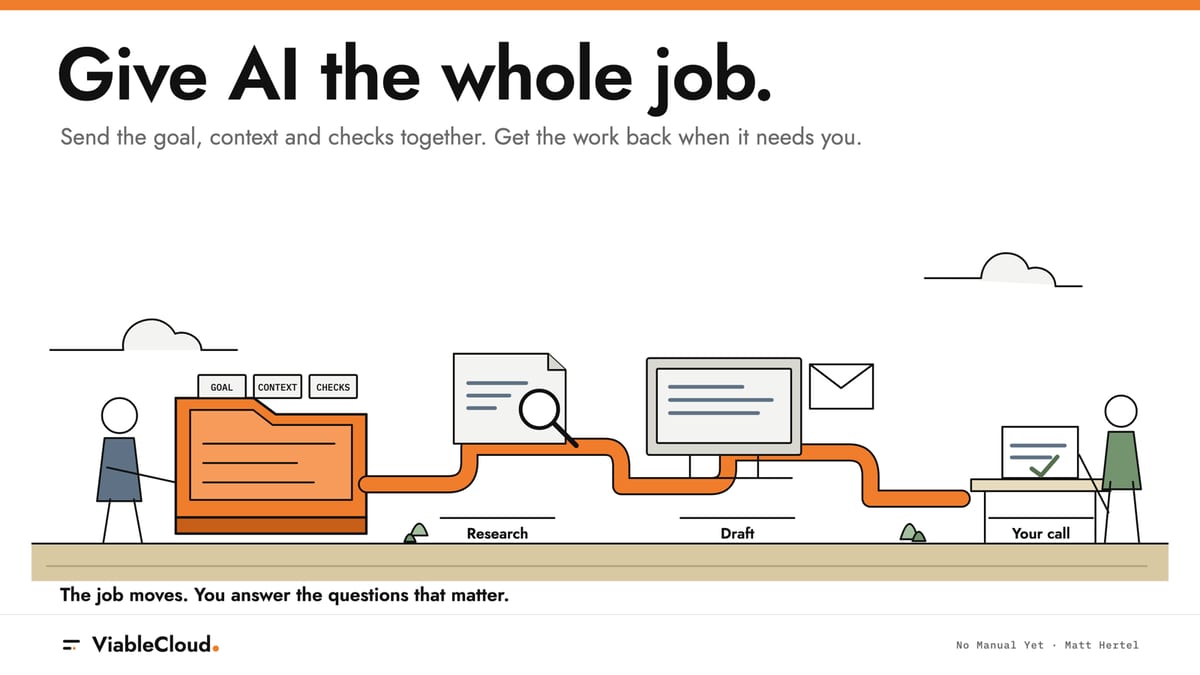
The odd bit about an AI-native company is that you can hand over the job instead of the steps. The goal, the context it needs and the checks it has to pass all go in together. What the research found reaches the draft without you pasting it across. The draft gets checked against the research before it lands in front of you.
Which leaves a slightly awkward question. If you're not carrying the work from one step to the next, what exactly are you doing all day?
Good question. The answer's more interesting than "pressing approve".
First, I'll tell you about my first software factory and the slightly greedy thing I wanted from it. Then I'll walk you through how to build one yourself! To prove it's not just for coding, we'll build a software factory for outbound. There will be three stages:
- by hand for one real person
- then a spreadsheet for a list
- then a small app on your laptop that does the keeping track for you.
Give it a goal and a person, and it comes back with linked research, a reason your offer might fit and three email drafts in your voice.
Drafts only. Nobody gets emailed by accident.
Let's go!
My first software factory
When I took my first stab at a software factory, I already had planners, orchestrators, review checks and QA checks. All the pieces were working incredibly well, but I was the bottleneck. The experiment was putting them together.
If that sounds like the staff list of a very strange company, here's roughly what each one does (the general idea, not a tour of my setup, because nobody signed up for a coding tutorial on a Sunday):
- A planner turns a goal into steps.
- An orchestrator hands each step on, along with what came before.
- A review check reads the work against what was asked.
- A QA check tests whether it actually works.
On their own, each one is useful. Each one also hands back an output that somebody has to pick up and carry to the next.
You've probably got a few stations of your own already. A chat that researches, another one that writes, maybe a third that tidies the tone. What's usually missing is the line between them, so you end up carrying everything across with your clipboard.
That's why it's called a factory. The work moves down a line, and each station gets what the last one learnt. Nobody walks it across the floor by hand.
And I had a slightly greedy goal for it.
I wanted it to tackle the biggest backlog of tickets I could find.
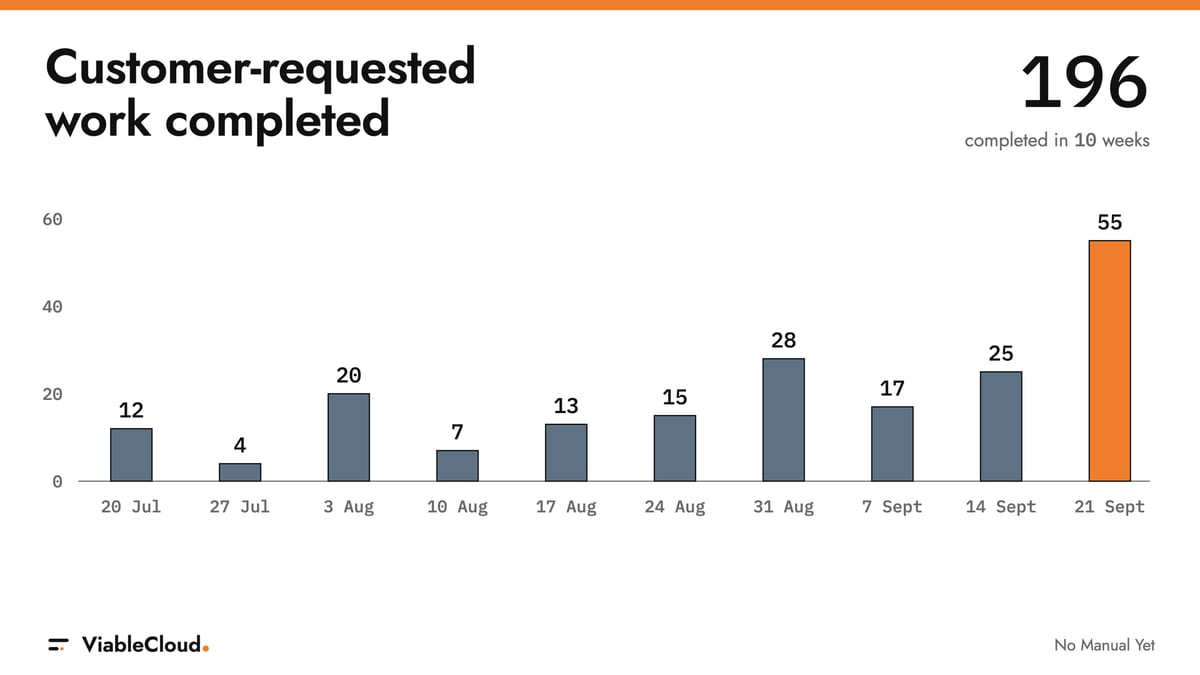
Before we move on, here's a chart of customer-requested work completed over the past 10 weeks.
If you squint, you can see when I got the software factory going.
Like any AI bro worth his salt, I built enough of the factory that it could help me build the next bit.
Yes, a factory that helps build the factory. I know how that sounds, very meta. Somewhere, a diagram just grew another arrow.
It was a first stab, and I'm not going to pretend it runs anything on its own while I'm on a beach somewhere. The beach will have to wait.
Stop being the conveyor belt
Here's the main idea: when the goal, the context and the checks travel with the work, you can stop manually carrying each output to the next step.
Think about how it works step by step. The context lives in your head and your clipboard. Every output comes back to you, and you're the one who remembers what the research said, which bit the draft forgot and what "sounds like us" actually means. Close the wrong tab and half of it's gone.
Hand over the whole job and that turns around. Nothing takes a detour through your clipboard. What comes back is a draft and a short list of what it wasn't sure about.
So what's left for you? Quite a lot, actually.
You choose the goal, because the factory has no idea what's worth doing this week. You supply what only you know: the offer, the relationship, how you sound. None of that is sitting on a public web page (thankfully, in some cases). You step in when it runs out of context or a check fails. And you decide what's true and whether anything goes out.
The stepping-in bit matters more than it looks. The work still comes back to you, but it only does when it really needs you. A setup like this should hand you things like "I couldn't find anything to back up this line", "I don't know when you last spoke to them" or "this follow-up repeats the first email". Those are yours to answer, and I'd take them over "here's step three, what now?" any day.
This is the bit I find weirdly delightful. You stop being a very expensive copy-paste button. Instead, you answer the questions that make it to you, say yes or no to a line, and hold a send when something's off.
Want to implement your own? It doesn't need to build code. It can be anything.
So let's pick something that isn't code.
Every company needs this: Outbound.
Think about what one decent email to one person actually involves. You find the right person, read what's public about them and their company, remember the last conversation if there was one, work out whether the new thing you're offering has anything to do with them, write it so it sounds like you, write follow-ups worth opening, and then decide whether any of it should go out. That's seven jobs dressed up as one. And it's very tempting to hand AI exactly one of them: the email.
That's where it can go wrong. When the research and the draft never meet, the "personalisation" can end up as a fact stapled to the front. "Loved your post about...", then a pitch that has nothing to do with the post. You've probably had a few. They read like somebody did the homework for a different class.
A factory joins the steps up. What the research finds feeds a reason the offer might fit. That reason feeds the email. Then a check reads each email against the research and takes out anything it can't back up. And it only counts as proper research if every fact comes back with a link you can open. If it can't show you where it read something, as far as you're concerned it didn't read it.
Here's a made-up example, so nobody's inbox gets involved. A small agency adds a new service: translating websites for new markets.
One prospect has a news page announcing a new office in Germany, and its website is only in English. That's a genuine reason the offer might matter, and both links come back with it. It still isn't proof they want a German website (maybe it's already in the works, maybe the German team is perfectly happy in English). So the email asks instead of diagnosing.
An existing client is a different job. The history you paste in (the last project, the last email) sets the tone, and the draft claims only as much familiarity as that history shows. If the last thing on record is a project wrap-up from last spring, it doesn't open like you had coffee on Tuesday.
A third prospect has nothing relevant online at all. No new office, no new market, nothing that connects to the offer. That one gets a gap and a short list of what you'd need to know, not three padded emails.
If there's no real reason to email them, it should say so.
There are lines it has to refuse along the way, too. "I noticed your website could be faster" assumes a problem it can't actually see. "I see you love sailing" uses a personal fact that has nothing to do with the offer. "Great catching up the other week", when there's no record of any catching up, invents a friendship. And every follow-up has to bring something the last one didn't: an example, a useful idea, a question worth answering. Never "just bumping this".
Then the part that stays with a person. It stops at drafts. Someone opens the links, checks the facts and decides whether and when anything gets sent.
Now for the main event: let's build one you can run on a real person this week.
Something you can implement by Friday
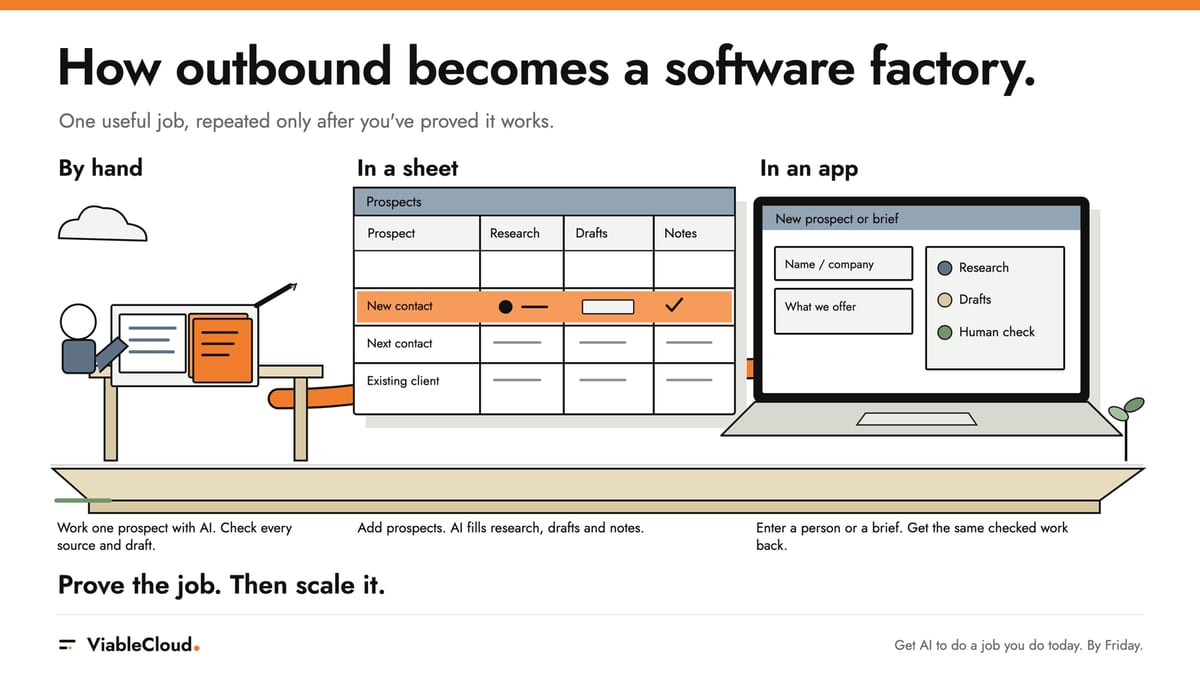
Build it in three stages: by hand for one person, then a spreadsheet for a list, then a small app on your laptop.
Each stage starts once the one before it stops surprising you. By Friday you only need the first. The other two can wait until you trust it (I'd rather you sent one good email than forty dodgy ones).
You can have this up and running in a few hours and the full thing in less than a week.
Phase 1: by hand, with AI doing the legwork
This is where you make the pieces. I already had planners and checks before I joined them into a factory. Phase 1 is how you get your own. You prove the steps on one real person, and you keep every correction somewhere you can use it again.
Start with the research tools. Three are worth connecting to whichever AI you already pay for. Exa finds the relevant pages. Perplexity digs into one focused question, like "have they launched anything new this year?" Firecrawl pulls the text out of a page so the AI can actually read it properly. Their jobs overlap, and you won't need all three every time.
Then add your CRM, or wherever your company keeps what it already knows (call notes, the shared drive, the company brain if you've got one). That way the research starts from what you know instead of from a search box. The setup links are in the PDF I'll mention at the end. If you can't connect any of them yet, built-in web search is enough for a first run.
A quick one before you paste anything in: only use what you're allowed to share, strip out anything confidential, and research their work, not their life (please, this is very important).
Next, teach it how you write. Just your emails for now. If your AI can read your sent folder, point it there. If it can't, paste them in.
Read my last 40 sent emails. Use only my words, not quoted replies or templates. Extract my greetings, sentence lengths, questions and sign-offs into a write-like-me skill. Separate first-contact emails from replies to people I know. Remove private details and flag patterns you're unsure about.
The PDF has the fuller extraction prompt.
Then read the skill and cross out anything that isn't you. It'll probably be mostly right and confidently wrong in a couple of places, like deciding you're a "Kind regards" person when you're very much a "Cheers". Anything you cross out goes into phrases to avoid. Forty emails make a decent starting reference. They won't make a clone of you. If you haven't done the digital cloning yet, I'll cover that next week.
Now pick one real person. Maybe it's a prospect you've been meaning to contact for months, or an existing client who should hear about the new thing. Here's what to give it:
My goal is [goal]. My offer is [offer]. Research [person and company], starting with our CRM and the context I've supplied. Link the facts, explain why the offer might fit and flag unknowns. Draft three emails using my write-like-me skill. Check their claims against the research and tell me what you removed. If there's no fit, say so. Don't send anything.
The PDF adds the full research and checking instructions, plus a worked example.
What comes back is linked research, a reason it might fit (or an honest gap), a list of unknowns, three editable drafts and a note of what the check took out. Read that note first. It's where you find out what it was tempted to make up. And if it comes back with a gap instead of emails, that's a result too. It's three emails you didn't send to someone who'd probably have deleted them.
Now check it like it's going out under your name, because it might. Open every link, and if a fact doesn't match the page, it goes. Read each email as if they were sitting next to you. Ask whether Day 2 and Day 3 actually give them something new, and whether it sounds like your emails or everyone else's. Day 1, 2 and 3 are three draft slots. When (and whether) they go out is your call, and emailing someone every day isn't the plan. If they reply to the first one, re-read everything before any follow-up goes anywhere.
Then comes the bit that turns this into a factory later. Every correction you'd make again goes into a skill. Research, fit check, drafting and checking each get one, sitting next to write-like-me. "For the translation offer, check which languages their site's already in before deciding it fits" belongs in the research skill. "Shorten this subject line" is probably a one-off, so it stays out.
Run the next person in a fresh chat. That's the honest test: if the skills are doing the remembering, you won't have to. Then do the one after. When you stop correcting the same things, you're ready for Phase 2.
Phase 2: put the list in a spreadsheet
Running your skills on the next person in a fresh chat works. You're still the one feeding it one person at a time, though. Once the skills hold up on a few people, it's time for a list.
Put it in a spreadsheet. Keep whatever columns you've already got (name, company, email, the one called "misc" that nobody remembers adding) and add exactly three new ones: Research, Drafts and Notes. This is where the skills you saved in Phase 1 start working through a list, and where you get to steer.
Notes is where you talk to the factory. That column is yours, and your directions go after "Owner:". "Owner: existing client." "Owner: no pitch yet." "Owner: focus on the new offer." Remember the stepping-in bit from earlier? This is the same thing. You're adding what only you know, but you write it down before the run instead of pasting it in halfway through.
A few rules keep the sheet honest. The AI reads your Owner lines before it researches anyone, and it never touches your words. If it has a gap or a question, it adds a line underneath starting with "AI check:", so you can always tell who said what. Every fact in Research keeps its link, the date on the source itself and the date it was checked, and if the source hasn't got a date, it says so (a new office from two years ago makes for a very different email than one announced last week, and the day you found it won't tell you which). Drafts holds the three drafts, or the honest gap when there's no real reason to email them.
Upload the sheet, or connect it if your AI can open it directly.
Run our checked process on the first five rows. Fill Research, Drafts and Notes. Keep sources linked and each person's context separate. Follow my Owner: notes without changing them. Add questions under AI check:. Skip drafts I've edited, flag failures and send nothing.
The ZIP has the blank workbook. The PDF adds the batch prompt's rerun and recovery rules.
Those five rows are your trial batch. Read every one before you run the next lot. You're checking the same things as in Phase 1, just more of them: the links, the fit, whether Day 2 and Day 3 give them something new. There's one new check too. Each contact's private history stays in that contact's row. The last project you did with one client should never turn up as a handy example in somebody else's email (that one's worth checking twice). And nothing gets sent. The sheet holds drafts. Sending's still your call.
This is your first proper taste of scale, and it's a big step up from one chat at a time. The catch is that you're still the one keeping track. Which draft did you edit? Who replied? Which row fell over halfway? Which ones need a rerun now the offer's changed? All of that goes back into your head, probably with some colour-coding if you're feeling fancy.
Don't go back to being the conveyor belt. We're almost there.
So the next step is getting something else to keep the books.
Phase 3: let AI build the factory
Ask AI to build you a small app that runs on your laptop. Claude Code or Codex are both good at this. The app's whole job is to take the steps and skills you proved in Phases 1 and 2 and join them up.
Remember my first factory? I already had planners, orchestrators and checks, and the experiment was putting them together. You're in exactly that spot now. Your skills are the pieces. The app is you putting them together. And getting AI to build that app out of your skills is the factory helping to build the next bit. Welcome to the club.
The screen can be almost embarrassingly simple. You get two options. Add one new prospect, or add a new brief or offer and pick which prospects should hear about it. Either way, the app runs the same steps in the same order you did by hand, then stops and waits for you.
Each prospect gets one lasting record. The research and its sources, the context, the drafts, the open questions and a status all live together. Inside that record, keep things in separate compartments: what you found about them, your history with them, the approved offer and what you're allowed to claim about it, the next ask, and the drafts. That way the research can't quietly rewrite your offer, and one client's history can't wander into somebody else's email.
This is the moment the context stops living in your clipboard. It lives in the record, and each step reads it from there.
Then there are the rules that should never bend. Those go in plain code. An AI's good intentions are lovely, and I still wouldn't let them decide whether someone ends up with the same campaign twice by accident. These are the ones I'd insist on:
- The same person on the same offer never gets a second run by accident. If an import or a retry repeats them, it picks up the record that's already there instead of starting again. A new offer for people you've picked on purpose is fine, and their history, your edits and your picks come along with it.
- If a run falls over halfway, it picks up where it stopped instead of starting again.
- Your edits are kept. Nothing overwrites a draft you've touched.
- An edited draft needs approving again. Your approval was for the old words.
- A reply stops every pending follow-up until you've re-read everything.
- "Unknown" never counts as "no". If it couldn't find out whether our made-up agency's prospect already has a German site, that's a question on the record, and they stay on the list.
- Nothing gets sent. Ever.
Why code for these? The AI does the reading and the writing, and it's allowed a bit of creativity there. Whether a follow-up goes out after someone's already replied isn't a creative question.
Build a small app that runs on my laptop. Let me add a prospect or a new offer for selected prospects. Join up the research, context, voice, drafting and checking skills we've tested. Save progress and my edits, show failures and stop at drafts for review. Implement the rules listed above.
The PDF has the full build brief, plus separate prompts for saved progress, retries and checking the finished app. Test it on three of the same people you checked by hand and compare the results.
That comparison is why you did Phase 1 properly. You already know what good looks like for those three people, so if the app's version is worse, you'll spot it straight away. It probably won't be right first time, and that's fine, because now you can see exactly where.
And it still stops at drafts. You still open the links, check the facts and decide whether and when anything goes out.
Take it with you
As always, I've got a small gift for you.
I've put the whole route into a 27-page Outbound at scale PDF guide. This issue gives you the method and the checks I'd use to judge the result. The guide gives you the expanded prompts, tool setup links, a worked three-email example and the full app build instructions, including how to test retries, saved edits and recovery after a failure. Keep it open beside your AI and work through one person first.
It comes with an Outbound at scale starter kit ZIP. Inside are the research, fit-check, drafting and checking skills, a starter write-like-me skill (it needs your own emails, it doesn't turn up already knowing you), every prompt as a Markdown file, the sheet as an Excel workbook with a blank CSV and a made-up one to practise on, some business and context templates, and a made-up three-email example. There's no app in there. That one's yours to build in Phase 3.
The skill to start from is in the ZIP too. It's called outbound-at-scale. Invoke it when you've got a goal, an offer and one person, or a sheet full of them. Give it the goal, the approved offer, the person (a prospect or an existing contact) and whatever history or example emails you've got. It's designed to come back with linked research, a reason your offer might fit, what it doesn't know and three editable drafts, or the gap if there's no real fit. Then it stops. It won't build the app for you and it won't send anything (so start with one person and check those emails before you go anywhere near an app).
By Friday: one checked voice skill, one person researched with links, three drafts you'd put your name to (or one honest gap), and your corrections saved as skills.
The sheet and the app can wait until that works. Your list has waited this long.
If it worked, tell me. If it didn't, tell me too. I'd love to see what it refused to write.
No manual yet
What I find strange about working AI-native is that the work stops coming back to you after every step, and starts coming back when it needs you.
The send button's still yours, though.
I wanted my first factory to help me build its own next bit. Yours can start smaller: one person, researched properly, by hand. The app can come once the steps have stopped surprising you.
I'm still ridiculously excited about what we can build now.
I'd just like every cold email to turn up having done this much homework.
You survived another week in this strange new world AND another one of my articles. Amazing!
Over to you now: which job do you still carry from one AI chat to the next by hand?
Take it with you
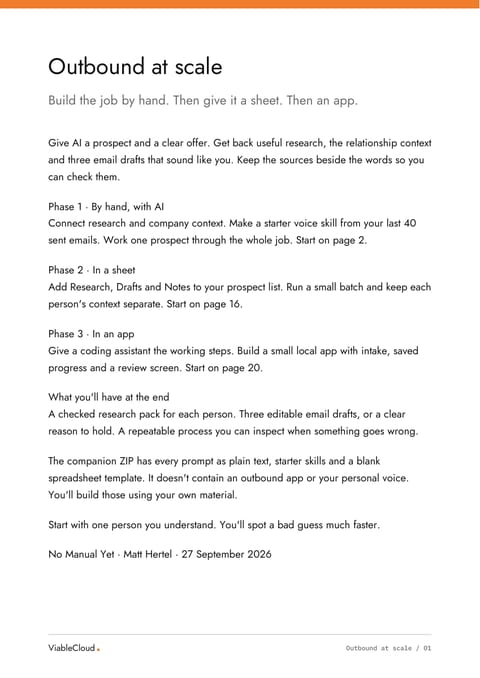
Outbound at scale: the build guide
A 27-page PDF with three phases, copyable prompts, a worked email example and checks for the finished app.
PDF · 68 KB
Outbound at scale: the starter kit
A ZIP with six starter skills, every guide prompt, an Excel sheet, CSV templates and a fictional worked campaign.
ZIP · 23 KB